View hidden password in Web forms
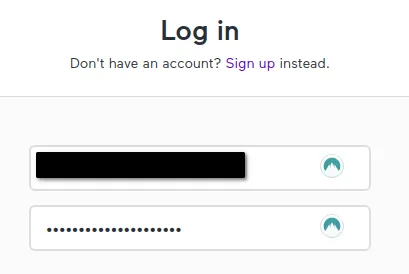
You have provided the password to a Web form and the password has been saved by your browser but is shown as masked. You have forgotten the password and need to gain access to it.
Resolution
Section titled “Resolution”Navigate to the Web Form with the masked password by using any major Web browser. Right click on the HTML field with the masked password and choose “Inspect element”.
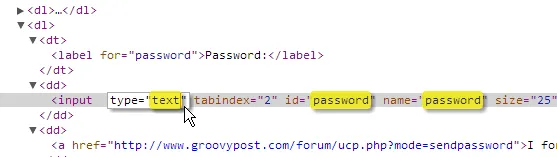
When the HTML Editor opens, look for input type = “password” field and change “password” to “text” and press Enter to save. Revert your changes in the HTML element after you have taken note of the clear text password.
4. TRACE-AI Execution Workflow
Section titled “4. TRACE-AI Execution Workflow”- Triage: Review monitoring dashboards or error metrics for initial anomaly spikes or timeout signatures.
- Record Evidence: Export service diagnostic logs, event viewers, or failure traces.
- Analyze: Correlate error signatures against known infrastructure or configuration limits.
- Correlate: Match active incident timeline against recent deployments or scale events.
- Execute & Verify: Apply corrective remediation steps and verify telemetry baseline recovery.
5. Vendor Documentation & Validation Guardrails
Section titled “5. Vendor Documentation & Validation Guardrails”- Authority Reference: Cross-reference configuration changes against official vendor documentation.
- Validation Gate: Require staging environment testing and Human-in-the-Loop SME approval before production changes.