Azure load balancing service options
Azure provides a suite of fully managed load-balancing solutions for your scenarios. Combine this article with my separate articles on Azure migration and Azure App Service design considerations.
Azure Front Door
Section titled “Azure Front Door”Azure Front Door (AFD) works at Layer 7 (HTTP/HTTPS layer) using anycast protocol with split TCP and Microsoft’s global network to improve global connectivity. Based on your routing method you can ensure that Front Door will route your client requests to the fastest and most available application backend. An application backend is any Internet-facing service hosted inside or outside of Azure. Front Door provides a range of traffic-routing methods and backend health monitoring options to suit different application needs and automatic failover scenarios. Similar to Traffic Manager, Front Door is resilient to failures, including failures to an entire Azure region.
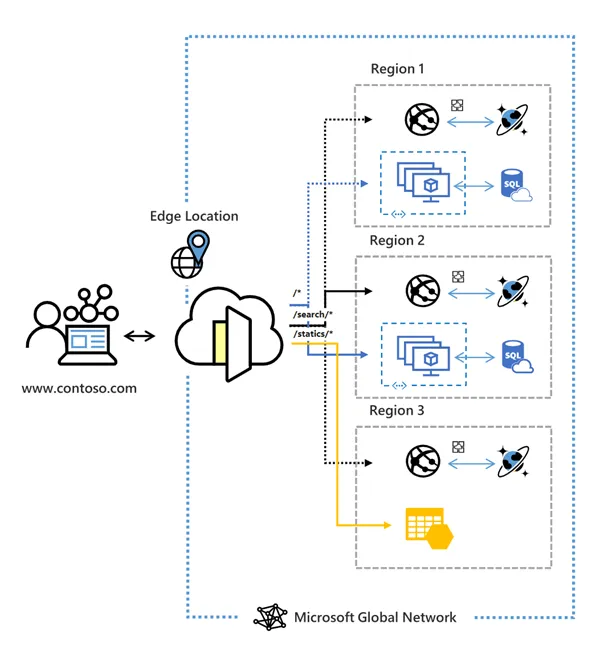
Azure Front Door can be combined with combined with Web Application Firewall and offers the following features out of the box:
-
Accelerated application performance by using split TCP-based anycast protocol.
-
Intelligent health probe monitoring for backend resources.
-
URL-path based routing for requests.
-
Enables hosting of multiple websites for efficient application infrastructure.
-
Cookie-based session affinity.
-
SSL offloading and certificate management.
-
Define your own custom domain.
-
Application security with integrated Web Application Firewall (WAF).
-
Redirect HTTP traffic to HTTPS with URL redirect.
-
Custom forwarding path with URL rewrite.
-
Native support of end-to-end IPv6 connectivity and HTTP/2 protocol.
Alternative Azure load balancing services
Section titled “Alternative Azure load balancing services”The following alternative Azure services are available, depending on your usage scenario and design:
-
If you are looking to do DNS based global routing and do not have requirements for Transport Layer Security (TLS) protocol termination (“SSL offload”), per-HTTP/HTTPS request or application-layer processing, review Traffic Manager.
-
If you want to load balance between your servers in a region at the application layer, review Application Gateway, which can be especially useful when combined with Web Application Firewall.
-
To do network layer load balancing, review Load Balancer.
Depending on your architecture scenario, you may also need to combine two or more of the above Azure load balancing options, especially in multi-region deployments. Use the following decision tree provided by Microsoft to determine your best Azure load balancing design approach.
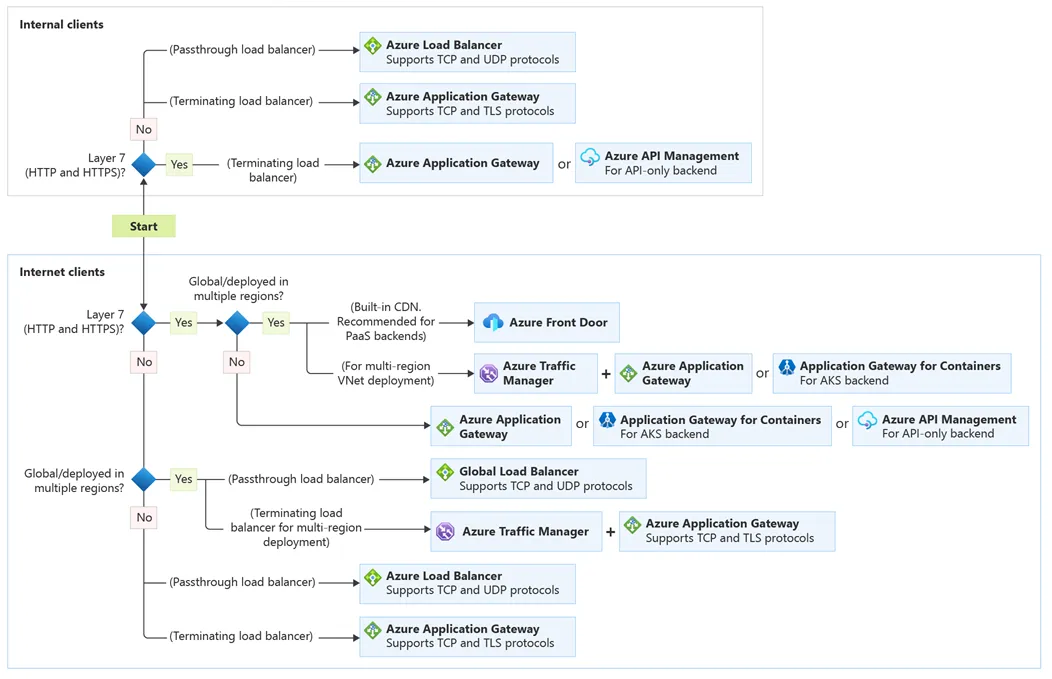
Your end-to-end scenarios may benefit from combining the load balancing solutions as needed. Consider other custom cases as well which are not shown in the above diagram. One such case is described at https://docs.microsoft.com/en-us/azure/architecture/high-availability/reference-architecture-traffic-manager-application-gateway and covers a multi-region load balancing solution with Traffic Manager and Application Gateway. For an Azure load-balancing options comparison, see Overview of load-balancing options in Azure.
Also review the following resource for guidance:
The “Help me choose” wizard in the Load Balancing services section of the Azure portal should help you make your decision based on your requirements as design factors.
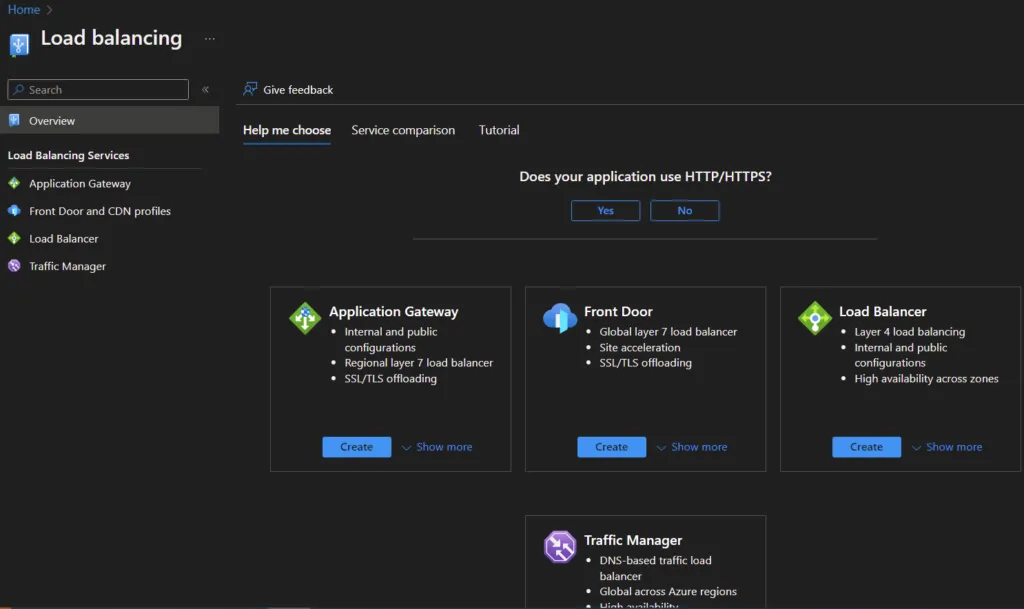
Update (March 2022)
Azure Cross-region load balancer resource is now in Public Preview. This preview version is provided without a service level agreement, and it’s not recommended for production workloads. Certain features might not be supported or might have constrained capabilities. The Azure cross-region load balancer resource architecture is the following, as provided by Microsoft.
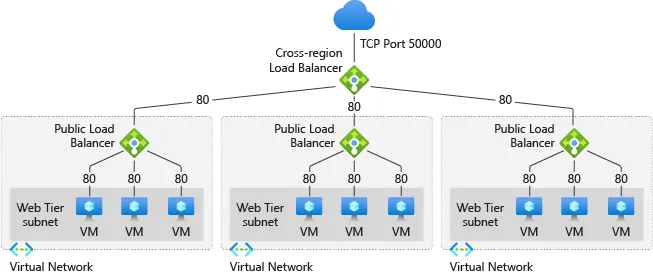
More details can be found at https://docs.microsoft.com/en-us/azure/load-balancer/cross-region-overview.
Sources
Section titled “Sources”https://docs.microsoft.com/en-us/azure/frontdoor/front-door-overview
https://docs.microsoft.com/en-us/azure/architecture/guide/technology-choices/load-balancing-overview
4. TRACE-AI Execution Workflow
Section titled “4. TRACE-AI Execution Workflow”- Triage: Review monitoring dashboards or error metrics for initial anomaly spikes or timeout signatures.
- Record Evidence: Export service diagnostic logs, event viewers, or failure traces.
- Analyze: Correlate error signatures against known infrastructure or configuration limits.
- Correlate: Match active incident timeline against recent deployments or scale events.
- Execute & Verify: Apply corrective remediation steps and verify telemetry baseline recovery.
5. Vendor Documentation & Validation Guardrails
Section titled “5. Vendor Documentation & Validation Guardrails”- Authority Reference: Cross-reference configuration changes against official vendor documentation.
- Validation Gate: Require staging environment testing and Human-in-the-Loop SME approval before production changes.