Troubleshoot Azure AD Connect upgrade issues
This KB article provides guidance on how to troubleshoot Azure AD Connect upgrade issues.
Solution
Section titled “Solution”Follow step-by-step instructions about how to properly upgrade your Azure AD Connect client: https://docs.microsoft.com/en-us/azure/active-directory/hybrid/how-to-upgrade-previous-version
If, despite having upgraded your Azure AD Connect client using the recommended method, you get errors, read on. One common case which can come up during the Azure AD Connect client upgrade comes with the following error after you start the post-installation configuration wizard.
Error message is:
Unable to validate credentials due to an unexpected error. Restart Azure AD Connect with the /InteractiveAuth option to further diagnose the issue.
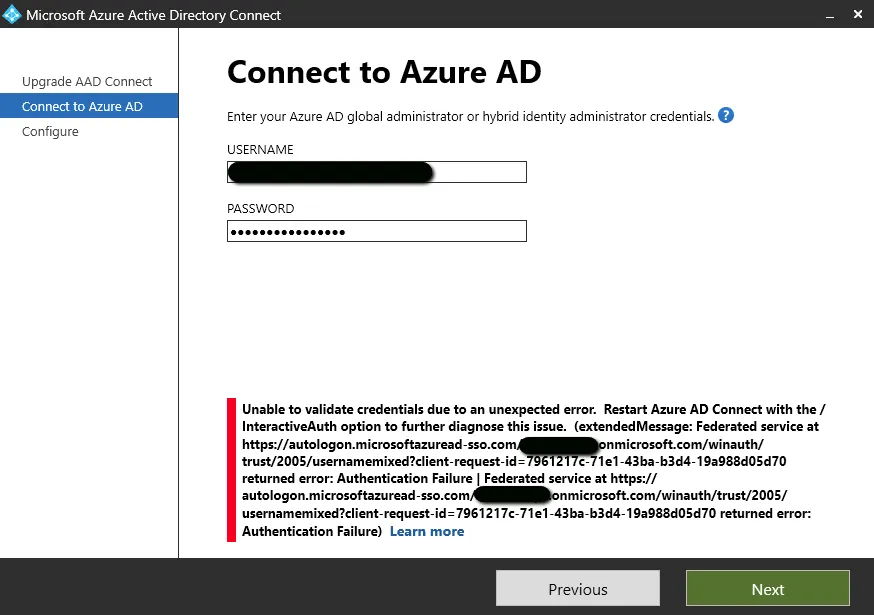
After running the Azure AD Connect client in InteractiveAuth mode with the /interactiveauth flag, you will be able to get more clarity into the authentication and authorization process. In my case, I had an expired Microsoft 365 account and without the /InteractiveMode parameter I was able to see the root cause. Also one other common case is MFA-related issues which would be resolved after more verbosity is provided in step-by-step authentication and authorization steps.
One more step to take when troubleshooting Azure AD Connect upgrade cases is to check that all Azure AD Connect pre-requisites have been met as per the following article: https://docs.microsoft.com/en-us/azure/active-directory/hybrid/tshoot-connect-connectivity#parsing-wstrust-response-failed
Last but not least, verify that TLS 1.2 is at minimum configured in your Azure AD tenant and your local Active Directory on-premises installation (operating system configuration for TLS 1.x) as per the following article: https://docs.microsoft.com/en-us/azure/active-directory/hybrid/how-to-connect-install-prerequisites#enable-tls-12-for-azure-ad-connect
To better understand Microsoft Azure AD and other Azure service compatibility support for TLS versions 1.0 and 1.1, refer to the relevant article of my blog about TLS version deprecation.
4. TRACE-AI Execution Workflow
Section titled “4. TRACE-AI Execution Workflow”- Triage: Review monitoring dashboards or error metrics for initial anomaly spikes or timeout signatures.
- Record Evidence: Export service diagnostic logs, event viewers, or failure traces.
- Analyze: Correlate error signatures against known infrastructure or configuration limits.
- Correlate: Match active incident timeline against recent deployments or scale events.
- Execute & Verify: Apply corrective remediation steps and verify telemetry baseline recovery.
5. Vendor Documentation & Validation Guardrails
Section titled “5. Vendor Documentation & Validation Guardrails”- Authority Reference: Cross-reference configuration changes against official vendor documentation.
- Validation Gate: Require staging environment testing and Human-in-the-Loop SME approval before production changes.