The trust relationship between this workstation and the primary domain failed
You have a healthy Active Directory domain joined workstation or server (domain member) which after a certain point in time fails to authenticate against the Active Directory domain with the following error.

The trust relationship between this workstation and the primary domain failed
Solution
Section titled “Solution”First off, you should login to the failed machine by using a local administrator password. If you do not remember the local Administrator password, the only way is to reset the local administrator password. You can follow my KB article on this issue which instructs how to reset a Windows local administrator password by using the Kali Linux distribution.
After you have logged onto the machine in question, run the following Powershell cmdlet to verify the issue first.
Test-ComputerSecureChannel -Verbose
Then run the following cmdlet to repair the AD trust relationship by resetting the machine AD computer object password.
Test-ComputerSecureChannel -Repair -Credential (Get-Credential)
and provide a domain administrator account credential to this cmdlet.
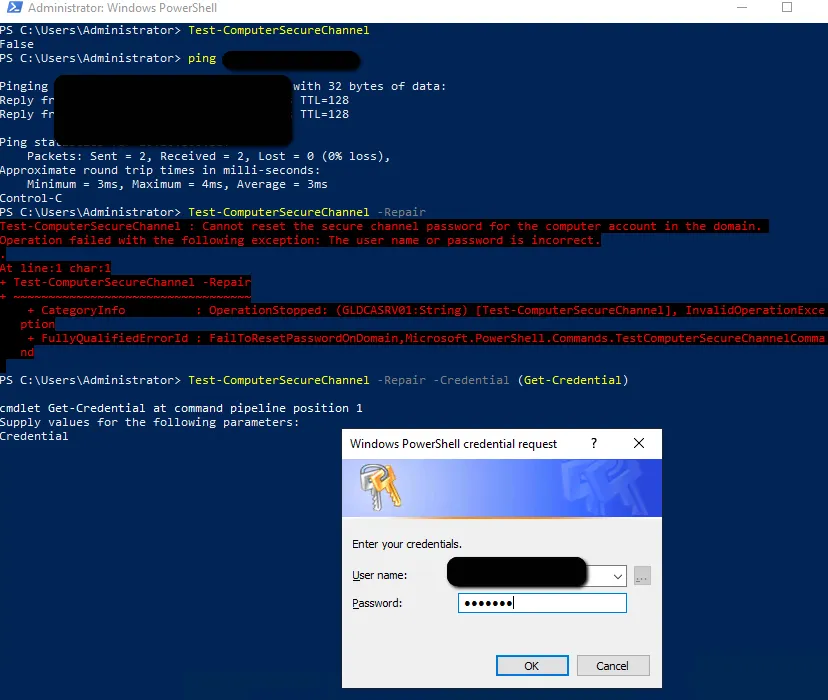
Then run the following cmdlets to verify the issue has been fixed.
Test-ComputerSecureChannel -Verbose
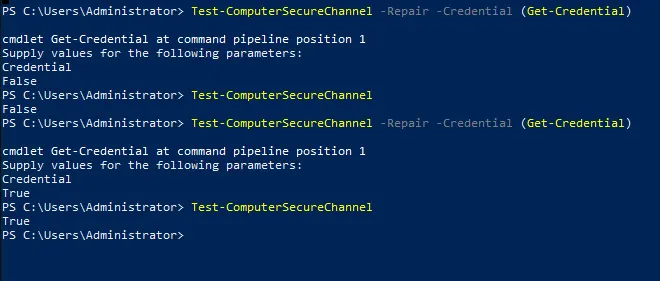
After the above, logoff and you should now be ready to perform an RDP logon again with your AD domain credentials.
An alternative way to resolve the above issue is to remove the machine from the domain (into a WORKGROUP), reboot the PC, then join the AD domain again and reboot.
4. TRACE-AI Execution Workflow
Section titled “4. TRACE-AI Execution Workflow”- Triage: Review monitoring dashboards or error metrics for initial anomaly spikes or timeout signatures.
- Record Evidence: Export service diagnostic logs, event viewers, or failure traces.
- Analyze: Correlate error signatures against known infrastructure or configuration limits.
- Correlate: Match active incident timeline against recent deployments or scale events.
- Execute & Verify: Apply corrective remediation steps and verify telemetry baseline recovery.
5. Vendor Documentation & Validation Guardrails
Section titled “5. Vendor Documentation & Validation Guardrails”- Authority Reference: Cross-reference configuration changes against official vendor documentation.
- Validation Gate: Require staging environment testing and Human-in-the-Loop SME approval before production changes.