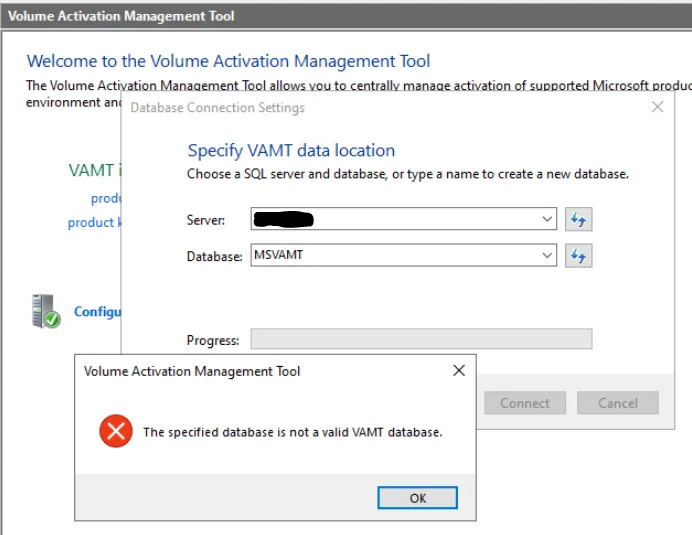
The specified database is not a valid VAMT database
You have the latest version of Microsoft Volume Activation Management tool (VAMT) installed on a Windows 10/11 or Windows 2019/2022 server. You have the latest version of Volume Activation Management tool (VAMT) installed on a Windows 10/11 or Windows 2019/2022 server. You run the tool for the first time to create the VAMT database on a remote SQL Server instance and you receive the following error: The specified database is not a valid VAMT database.
The VAMT tool can be required for instance if you have a Citrix Virtual Apps and Desktops installation with Citrix Provisioning and you need to be able to automatically activate your Citrix Provisioning Virtual Delivery Agent (VDA) machines. This case is described at https://support.citrix.com/article/CTX221317/how-to-configure-microsoft-mak-volume-licensing-in-provisioning-services-server. This error occurs in the latest version of VAMT found in the Windows ADK for Windows Server 2022 or Windows 11, as of September 2023.
Solution
Section titled “Solution”This is a known bug in the VAMT software and you need to make a manual change in the VAMT database schema, as described below. Run the following SQL query against the VAMT database.
alter table base.GenuineStatusText alter column GenuineStatusText nvarchar(255) NULL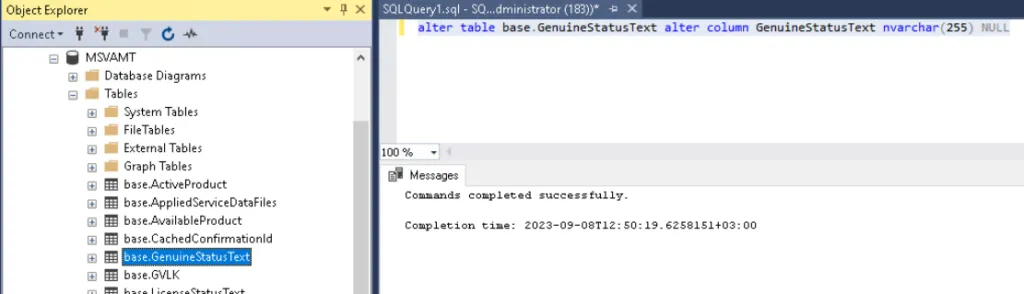
After the SQL query is successfully completed, you should be able to access the VAMT on the remote SQL server from within the VAMT tool.
This article provided a solution to error message The specified database is not a valid VAMT database.
4. TRACE-AI Execution Workflow
Section titled “4. TRACE-AI Execution Workflow”- Triage: Review monitoring dashboards or error metrics for initial anomaly spikes or timeout signatures.
- Record Evidence: Export service diagnostic logs, event viewers, or failure traces.
- Analyze: Correlate error signatures against known infrastructure or configuration limits.
- Correlate: Match active incident timeline against recent deployments or scale events.
- Execute & Verify: Apply corrective remediation steps and verify telemetry baseline recovery.
5. Vendor Documentation & Validation Guardrails
Section titled “5. Vendor Documentation & Validation Guardrails”- Authority Reference: Cross-reference configuration changes against official vendor documentation.
- Validation Gate: Require staging environment testing and Human-in-the-Loop SME approval before production changes.