The requested session access is denied
You try to RDP to a remote server and receive the message “The requested session access is denied”. Afterwards the RDP session is closed.
Solution
Section titled “Solution”Carry out the steps below to resolve the issue:
-
Check the target server’s event logs for any clear signs of the error root cause.
-
Ensure that the user you are connecting with is a member of the “Remote Desktop Users” security group on the target server. Or alternatively, verify that the “Allow users to connect remotely using Terminal Services policy” is set in the following location: Computer Configuration\Administrative Templates\Windows Components\Terminal Services\Terminal Server\Connections\.
-
Ensure that the Remote Desktop protocol is enabled on the target server.
-
Check if the user is a non-administrator user on the target server. If yes, then check if the RDP connection to the target server works with the credentials of a user who is administrator on the target server.
-
Check if the user who is receiving the above error message can connect to another target server which is licensed with RDS CALs.
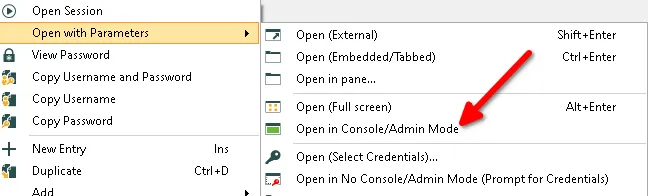
If the above are all true, then the issue lies in the fact that the user trying to connect to the target server is a non-admin user who is using the RDP /admin parameter. You need to remove the /admin parameter from the Microsoft standard RDP client (mstsc.exe) or, if you are using another 3rd party RDP client, do not use the “Admin Console†or “Console Session†option in your client. An example is shown below with the Devolutions RDP client.
4. TRACE-AI Execution Workflow
Section titled “4. TRACE-AI Execution Workflow”- Triage: Review monitoring dashboards or error metrics for initial anomaly spikes or timeout signatures.
- Record Evidence: Export service diagnostic logs, event viewers, or failure traces.
- Analyze: Correlate error signatures against known infrastructure or configuration limits.
- Correlate: Match active incident timeline against recent deployments or scale events.
- Execute & Verify: Apply corrective remediation steps and verify telemetry baseline recovery.
5. Vendor Documentation & Validation Guardrails
Section titled “5. Vendor Documentation & Validation Guardrails”- Authority Reference: Cross-reference configuration changes against official vendor documentation.
- Validation Gate: Require staging environment testing and Human-in-the-Loop SME approval before production changes.