Running old versions of .NET code in Azure App Service
You have an older than current (but supported) version of ASP.NET application code and you need to deploy your .NET application to the Azure App Service. For example, you may have ASP.NET apps running .NET version 4.6.1 and you need to deploy these apps to Azure App Service. The currently supported options for ASP.NET code are .NET 3.5 and NET 4.8.
Solution
Section titled “Solution”First you need to deploy the latest .NET runtime (https://dotnet.microsoft.com/download/dotnet-framework/net48) on your IIS server where your apps are hosted. After you install the latest (in this case ASP.NET 4.8 version), you need just to change the target framework in Visual Studio and the
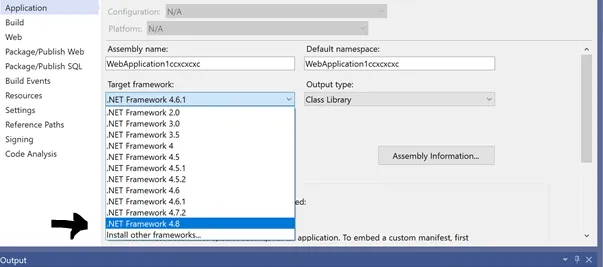
Visual Studio compatibility settings
Remember that .NET code is backward compatible. Backward compatibility means that an app that was developed for a particular version of a platform will run on later versions of that platform. .NET Framework tries to maximize backward compatibility: Source code written for one version of .NET Framework should compile on later versions of .NET Framework, and binaries that run on one version of .NET Framework should behave identically on later versions of .NET Framework.
You should review the following topics for application compatibility issues that may affect your app:
https://docs.microsoft.com/en-us/dotnet/framework/migration-guide/runtime/4.6.1-4.8
Upgrading the Web apps to 4.8 it is not mandatory to the Azure App service. Even if you choose version 4.8 in the Azure portal, since this is the only choice that is available in the drop down, the platform is still able to run the Application using 4.6.1. The 4.6.1 version is already installed on the Azure app service.
Microsoft encourages you to upgrade/retarget your apps to latest .NET version (currently 4.8) as it contains the many enhancements and the end of support of 4.6.1 will be 22/4/2022.
Sources
Section titled “Sources”.NET Framework 4.5.2, 4.6, 4.6.1 will reach End of Support on April 26, 2022 (microsoft.com)
https://docs.microsoft.com/en-us/dotnet/framework/migration-guide/version-compatibility
https://docs.microsoft.com/en-us/dotnet/framework/migration-guide/retargeting/4.6.1-4.8
4. TRACE-AI Execution Workflow
Section titled “4. TRACE-AI Execution Workflow”- Triage: Review monitoring dashboards or error metrics for initial anomaly spikes or timeout signatures.
- Record Evidence: Export service diagnostic logs, event viewers, or failure traces.
- Analyze: Correlate error signatures against known infrastructure or configuration limits.
- Correlate: Match active incident timeline against recent deployments or scale events.
- Execute & Verify: Apply corrective remediation steps and verify telemetry baseline recovery.
5. Vendor Documentation & Validation Guardrails
Section titled “5. Vendor Documentation & Validation Guardrails”- Authority Reference: Cross-reference configuration changes against official vendor documentation.
- Validation Gate: Require staging environment testing and Human-in-the-Loop SME approval before production changes.