RDS error "A Remote Desktop Services deployment does not exist in the server pool".
When opening the Server Manager to administer a server role topology, you receive the following error message: A Remote Desktop Services deployment does not exist in the server pool. To create a deployment, run the Add Roles and Features Wizard and select the Remote Desktop Services installation option.
Solution
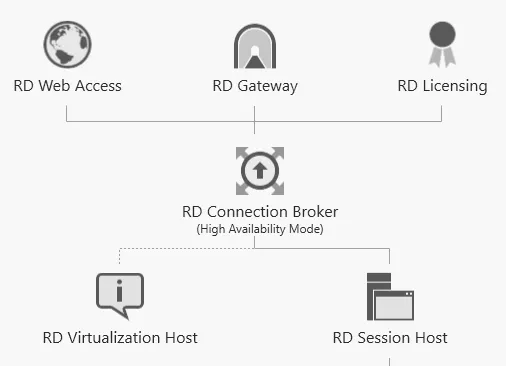
Section titled “Solution”First of all ensure that the RDS server roles are deployed on the RDS servers of the topology and that the RDS CB highly available database is online.
Then from the RDS management endpoint, import the RDS Powershell module by running the following cmdlet:
Import-Module RemoteDesktopRun the following cmdlets (depending on whether you have a session deployment or a virtual desktop deployment or both), in order to re-create the RDS deployment object:
new-rdsessiondeploymentnew-rdvirtualdesktopdeploymentAfter the above cmdlets, you should be ready to add new RDS Session Host collections by running following cmdlet:
new-rdsessioncollectionIn some cases, especially in older RDS versions, this error had been attributed to IPv6 protocol (should be disabled) and to PS Remoting not having been enabled on all RDS servers.
You should also be able to view the RDS topology in the Server Manager again.
Sources
Section titled “Sources”4. TRACE-AI Execution Workflow
Section titled “4. TRACE-AI Execution Workflow”- Triage: Review monitoring dashboards or error metrics for initial anomaly spikes or timeout signatures.
- Record Evidence: Export service diagnostic logs, event viewers, or failure traces.
- Analyze: Correlate error signatures against known infrastructure or configuration limits.
- Correlate: Match active incident timeline against recent deployments or scale events.
- Execute & Verify: Apply corrective remediation steps and verify telemetry baseline recovery.
5. Vendor Documentation & Validation Guardrails
Section titled “5. Vendor Documentation & Validation Guardrails”- Authority Reference: Cross-reference configuration changes against official vendor documentation.
- Validation Gate: Require staging environment testing and Human-in-the-Loop SME approval before production changes.