Optimizing your Windows network connections with TCP Optimizer
Introduction
Section titled “Introduction”The TCP Optimizer is a free, easy Windows program that provides an intuitive interface for tuning and optimizing your Internet connection. There is no installation required, just download and run as administrator. When optimizing your Windows network connections with TCP Optimizer, take into account my other KB article on how to troubleshoot your Internet connection.
The program can aid both the novice and the advanced user in tweaking related TCP/IP parameters in Windows, making it easy to tune your system to the type of Internet connection used. The tool uses advanced algorithms, and the bandwidth*delay product to find the best TCP Window for your specific connection speed. It provides for easy tuning of all related TCP/IP parameters, such as MTU, RWIN, and even advanced ones like QoS and ToS/Diffserv prioritization. The program works with all current versions of Windows, and includes additional tools, such as testing average latency over multiple hosts, and finding the largest possible packet size (MTU).
Configuration settings
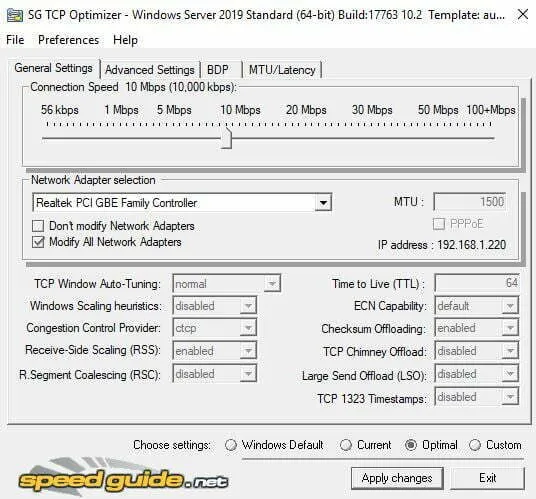
Section titled “Configuration settings”You can either manually fine tune the TCP/IP stack settings of your Windows computer or apply the optimal settings, as shown in the example screenshot below.
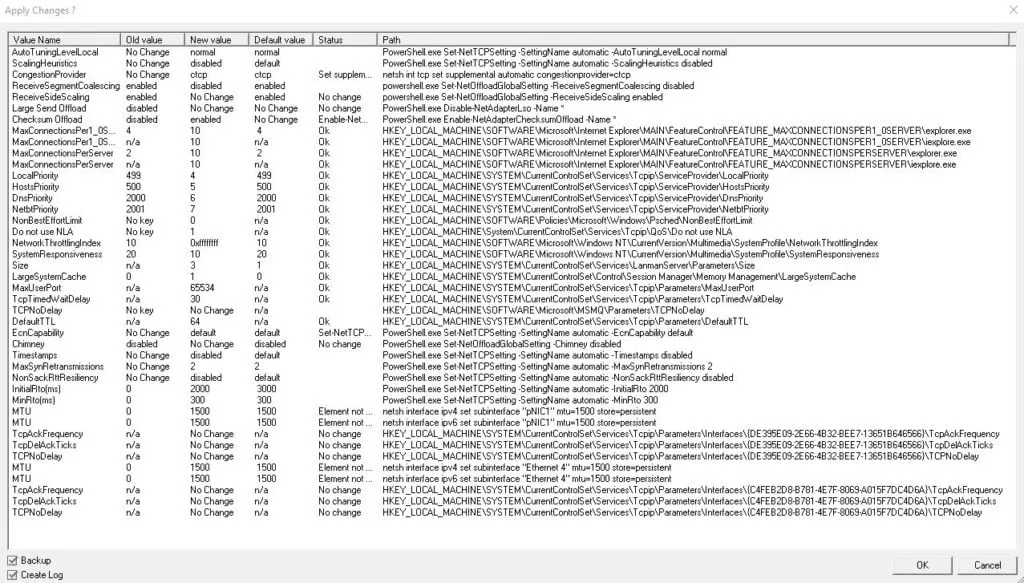
The following screenshot depicts all the TCP/IP stack parameters which are changed by TCP optimizer during the optimal settings application. There is option to take backup of previous state to revert to it if the optimal configuration does not work for your environment.
Source
Section titled “Source”https://www.speedguide.net/downloads.php
4. TRACE-AI Execution Workflow
Section titled “4. TRACE-AI Execution Workflow”- Triage: Review monitoring dashboards or error metrics for initial anomaly spikes or timeout signatures.
- Record Evidence: Export service diagnostic logs, event viewers, or failure traces.
- Analyze: Correlate error signatures against known infrastructure or configuration limits.
- Correlate: Match active incident timeline against recent deployments or scale events.
- Execute & Verify: Apply corrective remediation steps and verify telemetry baseline recovery.
5. Vendor Documentation & Validation Guardrails
Section titled “5. Vendor Documentation & Validation Guardrails”- Authority Reference: Cross-reference configuration changes against official vendor documentation.
- Validation Gate: Require staging environment testing and Human-in-the-Loop SME approval before production changes.