How to resolve "Microsoft Excel cannot open or save any more documents" warning
You are trying to open an Office file in any Office application, e.g. Excel and you receive the following error:

Microsoft Excel cannot open or save any more documents.
Solution
Section titled “Solution”This warning is very tricky and can have many potential root causes. Check the following items when troubleshooting:
- First off, check the actual server/workstation resource usage, including disk space, RAM memory and CPU utilization. Also check the administrative event logs in the windows event viewer.
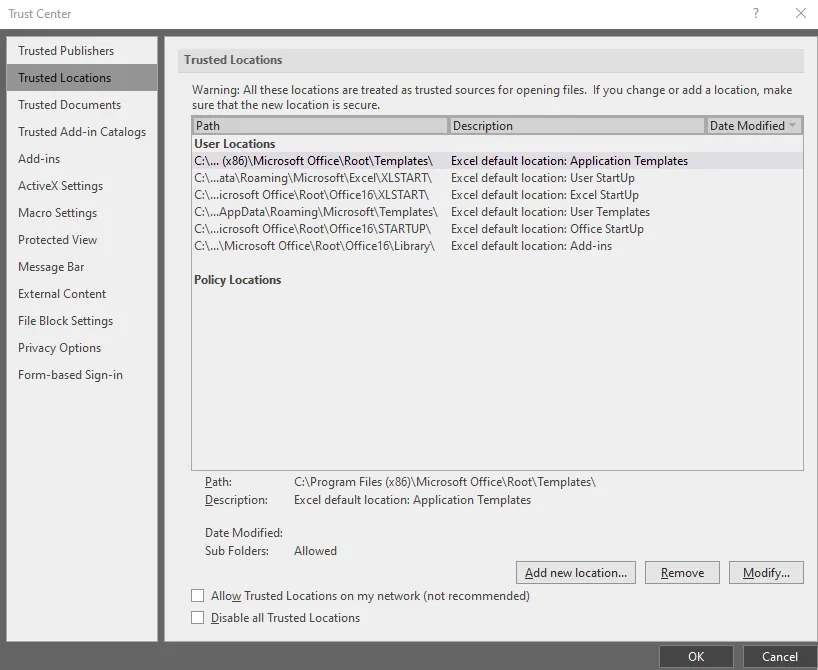
- In many cases this warning is misleading because it actually points to a security trust issue. On the affected MS Office file, right click and choose Properties –> General and untick the Unblock button. If this resolves the issue, then consider changing the security settings inside the Microsoft application to let the MS application trust the folder where the file resides. This can be setup from inside MS app, eg Excel, go to File –> Options –> Trust Center –> Trust Center Settings –Trusted Locations. Try the following: a) Tick the allow trusted locations on my network and b) Click the Add new location button and add the UNC path of the folder where the file in question resides.
4. TRACE-AI Execution Workflow
Section titled “4. TRACE-AI Execution Workflow”- Triage: Review monitoring dashboards or error metrics for initial anomaly spikes or timeout signatures.
- Record Evidence: Export service diagnostic logs, event viewers, or failure traces.
- Analyze: Correlate error signatures against known infrastructure or configuration limits.
- Correlate: Match active incident timeline against recent deployments or scale events.
- Execute & Verify: Apply corrective remediation steps and verify telemetry baseline recovery.
5. Vendor Documentation & Validation Guardrails
Section titled “5. Vendor Documentation & Validation Guardrails”- Authority Reference: Cross-reference configuration changes against official vendor documentation.
- Validation Gate: Require staging environment testing and Human-in-the-Loop SME approval before production changes.