Java jar files do not open by double click on Windows
You need to run a Java Archive File (JAR) to execute a Java Runtime Environment (JRE) based application in a Windows 10, 11 or Windows Server environment. Double clicking the JAR file does not case any action or it does not work as expected and the Java application is not launched. This article provides guidance on how to resolve issue when Java jar files do not open by double click on Windows.
Solution
Section titled “Solution”You should carry out the following steps:
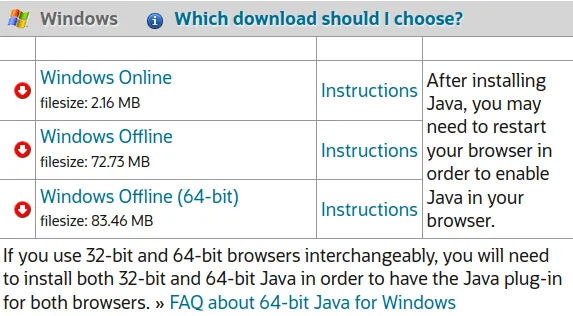
- Uninstall the current JRE version and download and install the latest version for your operating system from the Oracle website. Take the installation bitiness into account, i.e. 32-bit vs 64-bit.
-
Ensure that the JAR file type association (FTA) is configured correctly for your operating system. Set Java.exe as a default application for the .jar Files.
-
Create a Windows .bat or .cmd file and execute the jar file by running the following command: javaw -jar [jar file path/name].
-
If all else fails, download and run the free JarFix tool, which is available at https://johann.loefflmann.net/en/software/jarfix/index.html. The jarfix tool fixes any .jar file issues when trying to launch by double-click.
4. TRACE-AI Execution Workflow
Section titled “4. TRACE-AI Execution Workflow”- Triage: Review monitoring dashboards or error metrics for initial anomaly spikes or timeout signatures.
- Record Evidence: Export service diagnostic logs, event viewers, or failure traces.
- Analyze: Correlate error signatures against known infrastructure or configuration limits.
- Correlate: Match active incident timeline against recent deployments or scale events.
- Execute & Verify: Apply corrective remediation steps and verify telemetry baseline recovery.
5. Vendor Documentation & Validation Guardrails
Section titled “5. Vendor Documentation & Validation Guardrails”- Authority Reference: Cross-reference configuration changes against official vendor documentation.
- Validation Gate: Require staging environment testing and Human-in-the-Loop SME approval before production changes.