How to test USB device redirection for Citrix Virtual Apps and Desktops
You need to use USB device redirection in your Citrix Virtual Apps and Desktops (VAD) session and confirm that your USB devices are compatible with Citrix VAD for USB redirection.
Remember that once a USB peripheral device is redirected to a session it becomes unavailable to the user physical endpoint device until the session has disconnected and the USB device connection is returned to the endpoint. After device redirection, the device will be managed by “Citrix remote USB bus” in the local device management (devmgmt.msc).
Solution
Section titled “Solution”You should make use of the Citrix Peripherals Easy Test Tool. This tool verifies your USB device redirection without the need to install Citrix Virtual Apps and Desktops.
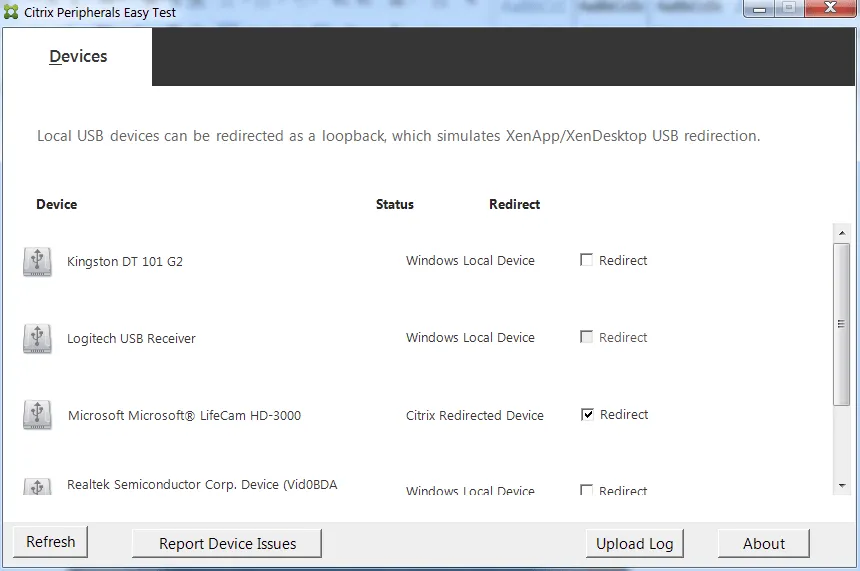
Prerequisites
- Peripherals Easy Test can be run on a physical machine with Windows 7 / Windows 8/ Windows 8.1/Windows 10/ Windows Server 2012/ Windows Server 2012 R2.
- The machine that Peripherals Easy Test will be installed on must be a machine without any Citrix products (such as Citrix Receiver) already installed. If any Citrix products are already installed, the tool will fail to install.
- You must install .Net Framework 4.5 or higher before installing Peripherals Easy Test.
- Peripherals Easy Test must be run as a user with Administrative privileges for all features to be functional.
Source
Section titled “Source”https://support.citrix.com/article/CTX214040
4. TRACE-AI Execution Workflow
Section titled “4. TRACE-AI Execution Workflow”- Triage: Review monitoring dashboards or error metrics for initial anomaly spikes or timeout signatures.
- Record Evidence: Export service diagnostic logs, event viewers, or failure traces.
- Analyze: Correlate error signatures against known infrastructure or configuration limits.
- Correlate: Match active incident timeline against recent deployments or scale events.
- Execute & Verify: Apply corrective remediation steps and verify telemetry baseline recovery.
5. Vendor Documentation & Validation Guardrails
Section titled “5. Vendor Documentation & Validation Guardrails”- Authority Reference: Cross-reference configuration changes against official vendor documentation.
- Validation Gate: Require staging environment testing and Human-in-the-Loop SME approval before production changes.