How to set or change the SQL Server collation
You need to set the collation at either an SQL Server instance level or at a SQL Server database level. The collation can either be set at creation time or changed afterwards.
Solution
Section titled “Solution”Set or change the SQL collation at SQL Server instance level
Section titled “Set or change the SQL collation at SQL Server instance level”Changing the default collation for an instance of SQL Server can be a complex operation and involves the following steps:
- Make sure you have all the information or scripts needed to re-create your user databases and all the objects in them.
- Export all your data using a tool such as the bcp Utility. For more information, see Bulk Import and Export of Data (SQL Server).
- Drop all the user databases.
- Rebuild the master database specifying the new collation in the SQLCOLLATION property of the setup command. For example:
Setup /QUIET /ACTION=REBUILDDATABASE /INSTANCENAME=InstanceName/SQLSYSADMINACCOUNTS=accounts /[ SAPWD= StrongPassword ]/SQLCOLLATION=CollationNameFor more information, see Rebuild System Databases.
Create all the databases and all the objects in them.
Import all your data.
Set or change the SQL collation at SQL Server database level
Section titled “Set or change the SQL collation at SQL Server database level”Via the SQL Server Management Studio
- In Object Explorer, connect to an instance of the SQL Server Database Engine, expand that instance, and then expand Databases.
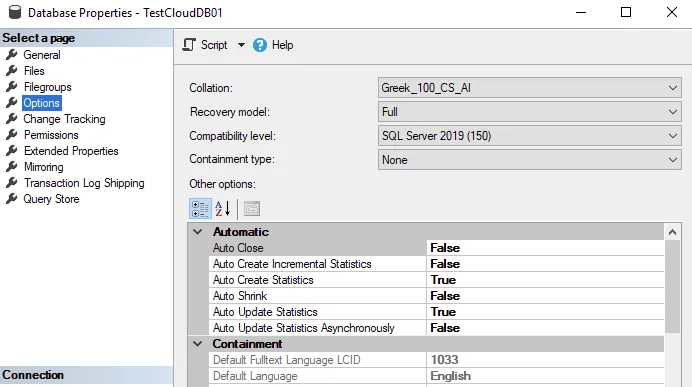
- If you are creating a new database, right-click Databases and then click New Database. If you do not want the default collation, click the Options page, and select a collation from the Collation drop-down list. Alternatively, if the database already exists, right-click the database that you want and click Properties. Click the Options page, and select a collation from the Collation drop-down list.
- After you are finished, click OK.
Via T-SQL command line
Section titled “Via T-SQL command line”To set the database collation
Section titled “To set the database collation”- Connect to the Database Engine.
- From the Standard bar, click New Query.
- Copy and paste the following example into the query window and click Execute. This example shows how to use the COLLATE clause to specify a collation name. The example creates the database
MyOptionsTestthat uses theLatin1_General_100_CS_AS_SCcollation. After you create the database, execute theSELECTstatement to verify the setting.
SQL
USE master;GOIF DB_ID (N'MyOptionsTest') IS NOT NULLDROP DATABASE MyOptionsTest;GOCREATE DATABASE MyOptionsTestCOLLATE Latin1_General_100_CS_AS_SC;GO
--Verify the collation setting.SELECT name, collation_nameFROM sys.databasesWHERE name = N'MyOptionsTest';GO
To change the database collation
Section titled “To change the database collation”- Connect to the Database Engine.
- From the Standard bar, click New Query.
- Copy and paste the following example into the query window and click Execute. This example shows how to use the COLLATE clause in an ALTER DATABASE statement to change the collation name. Execute the
SELECTstatement to verify the change.
SQL
USE master;GOALTER DATABASE MyOptionsTestCOLLATE French_CI_AS ;GO
--Verify the collation setting.SELECT name, collation_nameFROM sys.databasesWHERE name = N'MyOptionsTest';GO
Sources
Section titled “Sources”4. TRACE-AI Execution Workflow
Section titled “4. TRACE-AI Execution Workflow”- Triage: Review monitoring dashboards or error metrics for initial anomaly spikes or timeout signatures.
- Record Evidence: Export service diagnostic logs, event viewers, or failure traces.
- Analyze: Correlate error signatures against known infrastructure or configuration limits.
- Correlate: Match active incident timeline against recent deployments or scale events.
- Execute & Verify: Apply corrective remediation steps and verify telemetry baseline recovery.
5. Vendor Documentation & Validation Guardrails
Section titled “5. Vendor Documentation & Validation Guardrails”- Authority Reference: Cross-reference configuration changes against official vendor documentation.
- Validation Gate: Require staging environment testing and Human-in-the-Loop SME approval before production changes.