How to resolve Windows license activation issues
You are running a supported version of the Windows operating system, whose license you need to activate. You may encounter various possible error messages during license activation. This article provides guidance on how to resolve Windows license activation issues.
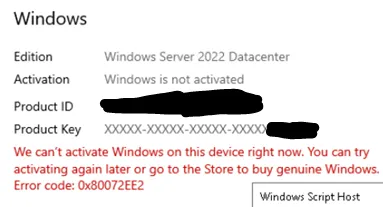
One example of Windows license activation error is the following error with error code 0x80072EE2. We can’t activate Windows on this device right now. You can try activating again later or go to the Store to buy genuine Windows.
Solution
Section titled “Solution”There are various Windows license activation methods, the major ones being KMS and MAK.
You should review the following KB articles of this blog, which are related to Windows license activation issues.
Furthermore, if your license activation issue is not resolved by following guidance from any of the KB articles below, follow the steps below for troubleshooting Windows license activation issues:
-
Ensure that your routing, firewall, HTTP(S) proxy and DNS setup do not block communication to the Microsoft license activation servers online. If the issue seems proxy-related, check the following article which provides more detailed instructions on how not to block TLS certificate revocation lists: https://support.microsoft.com/en-us/topic/windows-activation-or-validation-fails-with-error-code-0x8004fe33-a9afe65e-230b-c1ed-3414-39acd7fddf52. For DNS-related activation issues, consult the following article for a step-by-step procedure: https://learn.microsoft.com/en-us/windows-server/get-started/common-troubleshooting-procedures-kms-dns.
-
Review the troubleshooting steps available in the following articles:
-
Run the Microsoft license activation troubleshooter wizard, which you can download at https://support.microsoft.com/en-us/windows/using-the-windows-activation-troubleshooter-d717cdff-cf19-9770-7198-40119c2a696c.
-
Run the slmgr /ato command to manually activate your licenses online via the Microsoft activation servers.
-
You can also try Microsoft Virtual agent for further support: https://vsa.services.microsoft.com/en-us/v1.0/.
-
For license activation error code 0x80072EE2, consider generating the installation ID of your machine by running command slmgr /dti, then providing the installation ID to Microsoft activation support centers and then providing back the confirmation ID by phone.
-
Try contacting your local Microsoft activation center telephone support, as per https://www.microsoft.com/en-us/licensing/existing-customer/activation-centers.
4. TRACE-AI Execution Workflow
Section titled “4. TRACE-AI Execution Workflow”- Triage: Review monitoring dashboards or error metrics for initial anomaly spikes or timeout signatures.
- Record Evidence: Export service diagnostic logs, event viewers, or failure traces.
- Analyze: Correlate error signatures against known infrastructure or configuration limits.
- Correlate: Match active incident timeline against recent deployments or scale events.
- Execute & Verify: Apply corrective remediation steps and verify telemetry baseline recovery.
5. Vendor Documentation & Validation Guardrails
Section titled “5. Vendor Documentation & Validation Guardrails”- Authority Reference: Cross-reference configuration changes against official vendor documentation.
- Validation Gate: Require staging environment testing and Human-in-the-Loop SME approval before production changes.