How to resolve the Cannot complete your request error in Citrix VAD
How to resolve the Cannot complete your request error in Citrix VAD
Section titled “How to resolve the Cannot complete your request error in Citrix VAD”The “Cannot complete your request” error in Citrix VAD is probably one of the most generic Citrix VAD error messages. This error can be attributed to at least ~25 different root causes! This is a great example which proves that the error message by itself is not definitive of the actual issue. You should always seek to capture as much unique information from your Citrix VAD environment as possible so that you can truly isolate the underlying root cause.

The following CTX articles describe different reasons why you may receive the “cannot complete your request” error.
- https://support.citrix.com/article/CTX207162 (this is the master CTX article you should consult for this error message, contains most of the other CTX articles)
- https://support.citrix.com/article/CTX235843 (Citrix ADC DNS misconfiguration)
- https://support.citrix.com/article/CTX235858 (X-Forwarded-For disabled in Citrix ADC)
- https://support.citrix.com/article/CTX282271 (Storefront misconfiguration)
- https://support.citrix.com/article/CTX235968 (Storefront misconfiguration)
- https://support.citrix.com/article/CTX238964 (Storefront misconfiguration and IIS bindings)
- https://support.citrix.com/article/CTX262124 (Storefront or Citrix load balancing or Citrix Gateway misconfiguration)
- https://support.citrix.com/article/CTX235918 (Web proxy misconfiguration)
- https://support.citrix.com/article/CTX235915 (Stopped Storefront services)
- https://support.citrix.com/article/CTX235900 (Storefront misconfiguration)
- https://support.citrix.com/article/CTX235888 (Authentication misconfiguration in Citrix Gateway)
- https://support.citrix.com/article/CTX216704 (SAML authentication misconfiguration)
- https://support.citrix.com/article/CTX235909 (Authentication misconfiguration in Storefront)
- https://support.citrix.com/article/CTX235882 (DNS misconfiguration)
- https://support.citrix.com/article/CTX261738 (load balancing misconfiguration)
- https://support.citrix.com/article/CTX235899 (Citrix Gateway customized theme)
- https://support.citrix.com/article/CTX244520 (Citrix Gateway custom portal theme)
- https://support.citrix.com/article/CTX235906 (Expired TLS certificate)
- https://support.citrix.com/article/CTX235908 (TLS certificate misconfiguration)
- https://support.citrix.com/article/CTX235844 (TLS certificate misconfiguration)
- https://support.citrix.com/article/CTX282546 (SAML misconfiguration)
- https://support.citrix.com/article/CTX235849 (Persistence misconfiguration in ADC)
- https://support.citrix.com/article/CTX235970 (Customized app icon in Storefront)
Consult the following Citrix flow diagram as reference when troubleshooting the “cannot complete your request” error.
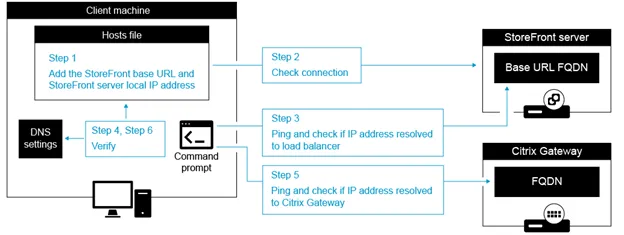
You can find more detailed guidance and step-by-step procedures for analyzing and troubleshooting Citrix Virtual Apps and Desktops organized by category in my Citrix Virtual Apps and Desktops Troubleshooting e-book.
4. TRACE-AI Execution Workflow
Section titled “4. TRACE-AI Execution Workflow”- Triage: Review monitoring dashboards or error metrics for initial anomaly spikes or timeout signatures.
- Record Evidence: Export service diagnostic logs, event viewers, or failure traces.
- Analyze: Correlate error signatures against known infrastructure or configuration limits.
- Correlate: Match active incident timeline against recent deployments or scale events.
- Execute & Verify: Apply corrective remediation steps and verify telemetry baseline recovery.
5. Vendor Documentation & Validation Guardrails
Section titled “5. Vendor Documentation & Validation Guardrails”- Authority Reference: Cross-reference configuration changes against official vendor documentation.
- Validation Gate: Require staging environment testing and Human-in-the-Loop SME approval before production changes.