How to resolve NDR 550 5.7.520 error in Exchange Online email forwarding
You have an Exchange Online mailbox or distribution list and you try to enable email forwarding to an external recipient. After a message is forwarded you receive a Non Delivery Receipt (NDR) with following error message:
‘550 5.7.520 Access denied, Your organization does not allow external forwarding. Please contact your administrator for further assistance. AS(7555)’.
Solution
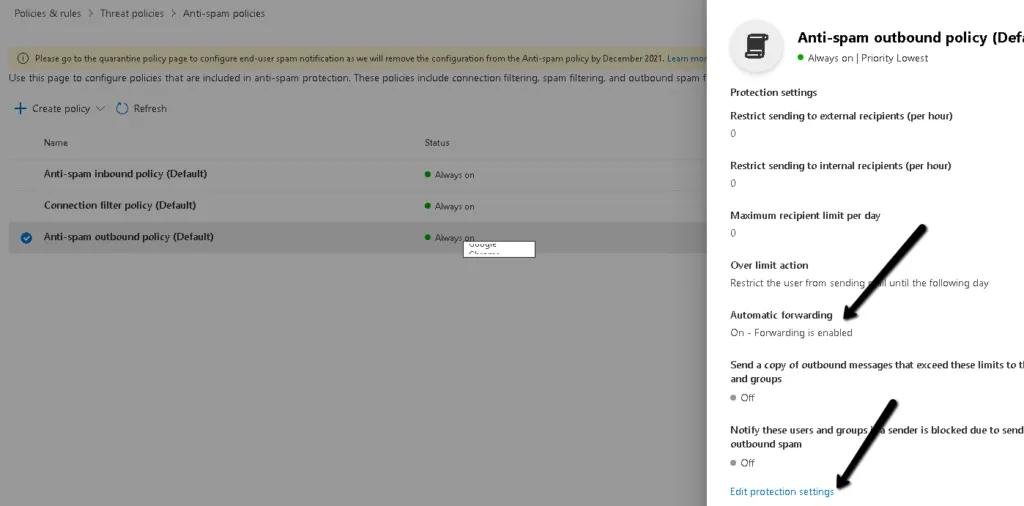
Section titled “Solution”In Microsoft 365 default anti-spam policies, the anti-spam outbound policy (Default) policy must be edited to turn “automatic forwarding” setting to On - Forwardin is enabled. Alternatively you can create another policy in which automatic forwarding will be enabled for all users and keep the default policy with automatic forwarding disabled for specific users or groups.
Troubleshooting Exchange Online NDR errors
Section titled “Troubleshooting Exchange Online NDR errors”For a more detailed step-by-step guidance on troubleshooting Exchange Online NDR errors, refer to the following article: https://docs.cloudschool.ai/kb/how-to-troubleshoot-exchange-online-ndr-errors/
4. TRACE-AI Execution Workflow
Section titled “4. TRACE-AI Execution Workflow”- Triage: Review monitoring dashboards or error metrics for initial anomaly spikes or timeout signatures.
- Record Evidence: Export service diagnostic logs, event viewers, or failure traces.
- Analyze: Correlate error signatures against known infrastructure or configuration limits.
- Correlate: Match active incident timeline against recent deployments or scale events.
- Execute & Verify: Apply corrective remediation steps and verify telemetry baseline recovery.
5. Vendor Documentation & Validation Guardrails
Section titled “5. Vendor Documentation & Validation Guardrails”- Authority Reference: Cross-reference configuration changes against official vendor documentation.
- Validation Gate: Require staging environment testing and Human-in-the-Loop SME approval before production changes.