How to resolve MS Teams error code 80070003
You are getting the following Microsoft Teams error when trying to launch and logon to MS Teams:
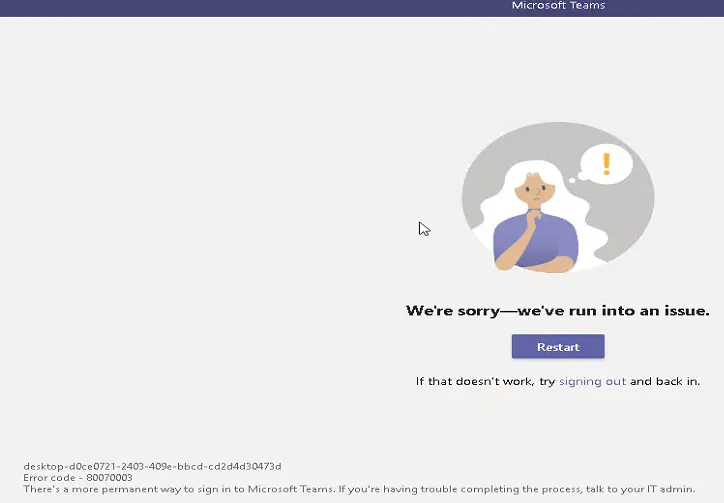
This issue has error code 80070003.
Solution
Section titled “Solution”As always you need to investigate the MS Teams logs of the affected users, located under
C:\Users\*\AppData\Roaming\Microsoft\Teams.
Error code
This issue has error code 80070003 can be resolved by following below process:
- Close/kill all MS Teams instances.
- Delete all files under the following path C:\Users*\AppData\Roaming\Microsoft\Teams.
- Upgrade Microsoft 365 and Teams to the latest version available in your release branch.
After deleting the above files and launching MS Teams again, all cache files are regenerated and user is able to logon.
In some cases, the above resolution is only temporary and the issue re-surfaces. As per https://docs.microsoft.com/en-us/answers/questions/127875/teams-on-rds-users-can39t-login.html, the following course of action seems to permanently fix the issue:
- Kill any running MS Teams processes of the affected user(s).
- Create registry entry to prevent users on RDS server from performing workplace AAD joins: HKLM\SOFTWARE\Policies\Microsoft\Windows\WorkplaceJoin, “BlockAADWorkplaceJoin”=dword:00000001
- Delete/Rename the following folders on the users profile:
- C:\Users\[username]\AppData\Local\Packages\Microsoft.AAD.BrokerPlugin_cw5n1h2txyewy
- C:\Users\[username]\AppData\Roaming\Microsoft\Teams
Ask the end users to launch Teams again and try to logon.
Sources
Section titled “Sources”https://docs.microsoft.com/en-us/answers/questions/127875/teams-on-rds-users-can39t-login.html
4. TRACE-AI Execution Workflow
Section titled “4. TRACE-AI Execution Workflow”- Triage: Review monitoring dashboards or error metrics for initial anomaly spikes or timeout signatures.
- Record Evidence: Export service diagnostic logs, event viewers, or failure traces.
- Analyze: Correlate error signatures against known infrastructure or configuration limits.
- Correlate: Match active incident timeline against recent deployments or scale events.
- Execute & Verify: Apply corrective remediation steps and verify telemetry baseline recovery.
5. Vendor Documentation & Validation Guardrails
Section titled “5. Vendor Documentation & Validation Guardrails”- Authority Reference: Cross-reference configuration changes against official vendor documentation.
- Validation Gate: Require staging environment testing and Human-in-the-Loop SME approval before production changes.