How to resolve issue with Citrix Gateway VPX losing its license after reboot
Symptoms and root cause
Section titled “Symptoms and root cause”NetScaler Host ID (MAC address of the primary management interface) changes every time the device reboots and Citrix Gateway VPX loses its license. This occurs in Hyper-V environments. This is because Hyper-V has a dynamic MAC address allocated by default to each Hyper-V VM.
Solution
Section titled “Solution”Ensure that the MAC address assigned to the primary Citrix Gateway management interface is set to static. In order to set the MAC address to static from within the Hyper-V cluster manager or Hyper-V manager console, follow the process below:
- Shut down the Citrix Gateway VM if it is already running.
- Open the VM settings and expand the management network adapter to the “Advanced Features” section.
- Click on the static radio button and set the desired MAC address.
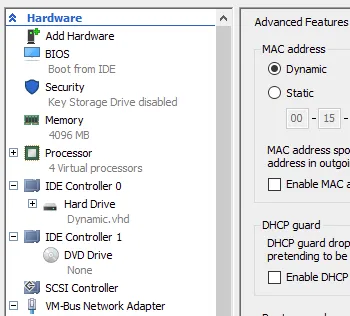
- Click OK to save the changes.
Source
Section titled “Source”https://support.citrix.com/article/CTX215079
4. TRACE-AI Execution Workflow
Section titled “4. TRACE-AI Execution Workflow”- Triage: Review monitoring dashboards or error metrics for initial anomaly spikes or timeout signatures.
- Record Evidence: Export service diagnostic logs, event viewers, or failure traces.
- Analyze: Correlate error signatures against known infrastructure or configuration limits.
- Correlate: Match active incident timeline against recent deployments or scale events.
- Execute & Verify: Apply corrective remediation steps and verify telemetry baseline recovery.
5. Vendor Documentation & Validation Guardrails
Section titled “5. Vendor Documentation & Validation Guardrails”- Authority Reference: Cross-reference configuration changes against official vendor documentation.
- Validation Gate: Require staging environment testing and Human-in-the-Loop SME approval before production changes.