How to resolve Citrix ADC VPX SSL service group monitor error due to SSL certificate key size
A Citrix ADC VPX SSL service groups monitor throws the following error via its monitoring probe.
Last response: failure – Time out during SSL handshake stageThis applies to the following SSL probes:
- https
- CITRIX-XD-DDC.
A Wireshark or Citrix ADC nstrace utility trace reveals the following error:
TLSv1 Record Layer: Alert (Level: Fatal, Description: Unsupported Certificate)Content Type: Alert (21)The certificate installed on the Citrix Delivery Controllers and Storefront servers has a key size larger than 4096 and this seems to be the underlying root cause.
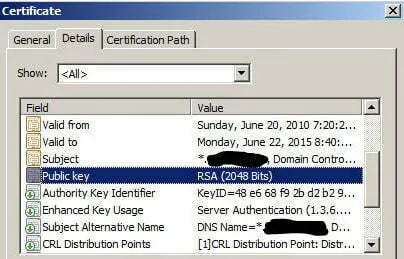
Citrix ADC VPX does not support keys longer than 4096 bits due to the lack of an SSL chip. This is not the case with NetScaler MPX appliances, because they have built-in SSL chips. SSL certificate key support is detailed in the following Citrix article: https://support.citrix.com/article/CTX206268
Resolution
Section titled “Resolution”You will need to create a new SSL certificate with a key size of 2048 or 4096 bits and bind it to the affected SSL service groups.
4. TRACE-AI Execution Workflow
Section titled “4. TRACE-AI Execution Workflow”- Triage: Review monitoring dashboards or error metrics for initial anomaly spikes or timeout signatures.
- Record Evidence: Export service diagnostic logs, event viewers, or failure traces.
- Analyze: Correlate error signatures against known infrastructure or configuration limits.
- Correlate: Match active incident timeline against recent deployments or scale events.
- Execute & Verify: Apply corrective remediation steps and verify telemetry baseline recovery.
5. Vendor Documentation & Validation Guardrails
Section titled “5. Vendor Documentation & Validation Guardrails”- Authority Reference: Cross-reference configuration changes against official vendor documentation.
- Validation Gate: Require staging environment testing and Human-in-the-Loop SME approval before production changes.