How to create a no-reply mailbox in Exchange Online
You have been requested to create a no-reply mailbox in your Microsoft365 organization. This article provides high level guidance on how to create a no-reply mailbox in Exchange Online.
Solution
Section titled “Solution”Creating a no-reply mailbox in Exchange Online can be accomplished by either of the following methods.
- Method 1. Create a shared mailbox (no license required). This allows you to attach this shared mailbox under any number of licensed mailbox users but does not allow SMTP auth (see https://learn.microsoft.com/en-us/answers/questions/538284/exchange-online-smtp-auth-using-shared-mailbox.html), ie you must use a licensed mailbox user to send emails on behalf of the shared mailbox, but this could result in your emails marked as spam.
- Method 2. Create a licensed mailbox (Exchange Online 1 is the most cost-effective plan for your requirements). This allows you to utilize the mailbox for SMTP auth programmatically without any spam issues.
In either method, you will have to create an Exchange mail transport rule, as shown in the below example.
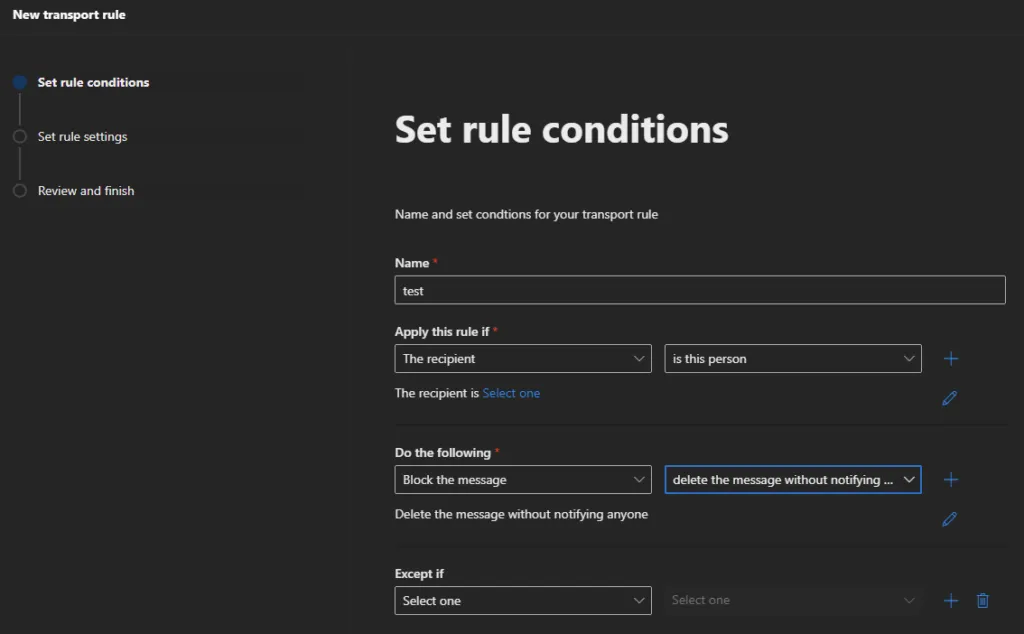
The email transport rule(s) can be used in accordance with an Outlook-based signature which will inform recipients that this is a no-reply and non-monitored mailbox.
4. TRACE-AI Execution Workflow
Section titled “4. TRACE-AI Execution Workflow”- Triage: Review monitoring dashboards or error metrics for initial anomaly spikes or timeout signatures.
- Record Evidence: Export service diagnostic logs, event viewers, or failure traces.
- Analyze: Correlate error signatures against known infrastructure or configuration limits.
- Correlate: Match active incident timeline against recent deployments or scale events.
- Execute & Verify: Apply corrective remediation steps and verify telemetry baseline recovery.
5. Vendor Documentation & Validation Guardrails
Section titled “5. Vendor Documentation & Validation Guardrails”- Authority Reference: Cross-reference configuration changes against official vendor documentation.
- Validation Gate: Require staging environment testing and Human-in-the-Loop SME approval before production changes.