How to convert RDS per-user to RDS per-device CALs
You need to convert existing Microsoft RDS per-user CALs to RDS per-device CALs or vice-versa. This article provides guidance on how to convert RDS per-user to RDS per-device CALs. Also you may want to refer to the following article if you need to troubleshoot RDS licensing issues: https://docs.cloudschool.ai/kb/how-to-troubleshoot-microsoft-rds-licensing-issues/
Solution
Section titled “Solution”You can convert RDS per-user to RDS per-device CALs or convert RDS per-device to RDS per-user CALs by utilizing the RDS licensing manager console (MMC console). Follow the steps below.
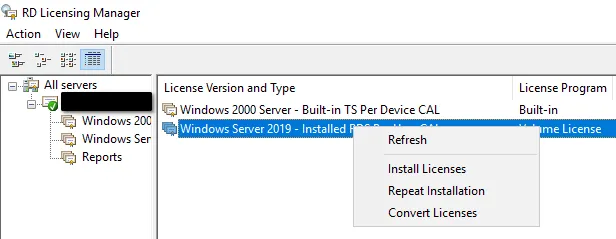
- In the RDS licensing manager console, expand the record which corresponds to the existing RDS licenses you wish to convert and right click on this record.
-
Choose “Convert licenses”.
-
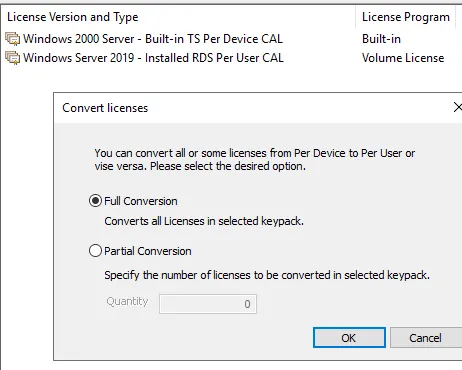
Choose between full and partial conversion and click “OK”.
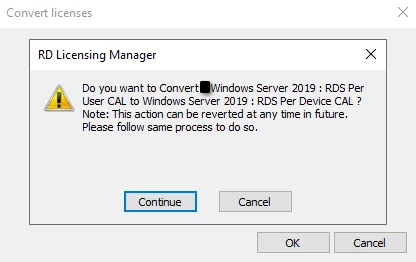
- Confirm the requested conversion by clicking “Continue”.
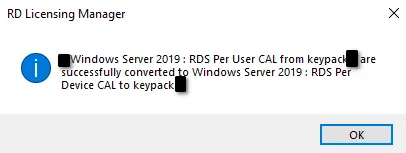
- RD Licensing manager will provide a confirmation message for successful RDS CAL type successful conversion.
4. TRACE-AI Execution Workflow
Section titled “4. TRACE-AI Execution Workflow”- Triage: Review monitoring dashboards or error metrics for initial anomaly spikes or timeout signatures.
- Record Evidence: Export service diagnostic logs, event viewers, or failure traces.
- Analyze: Correlate error signatures against known infrastructure or configuration limits.
- Correlate: Match active incident timeline against recent deployments or scale events.
- Execute & Verify: Apply corrective remediation steps and verify telemetry baseline recovery.
5. Vendor Documentation & Validation Guardrails
Section titled “5. Vendor Documentation & Validation Guardrails”- Authority Reference: Cross-reference configuration changes against official vendor documentation.
- Validation Gate: Require staging environment testing and Human-in-the-Loop SME approval before production changes.