How to convert a TLS certificate to PFX PKCS12 format
You have a custom TLS certificate from a Certificate Authority (CA) in PEM, CER, CRT or other compatible format. You need to convert this certificate to PFX format also known as PKCS12 format.
Solution
Section titled “Solution”The PFX/PKCS12 format includes the certificate private key. In order to convert your original certificate to PFX format you need the following files:
- Your original TLS certificate as provided by your CA.
- Certificate private key file (.txt or .key format)
- Your CA certificate authority intermediate certificate (in per or cer/crt format). In order to identify what your CA intermediate certificate is, there are basically two options:
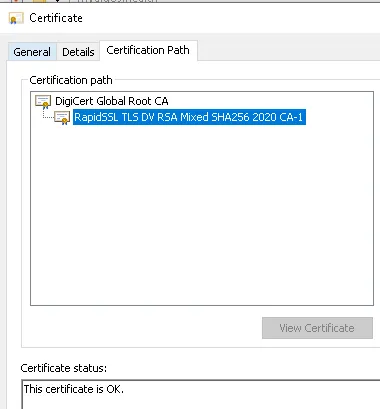
- If your original certificate is in CER/CRT format, you can easily import this certificate in the Windows/Linux/MacOS certificate store and inspect the certificate chain.
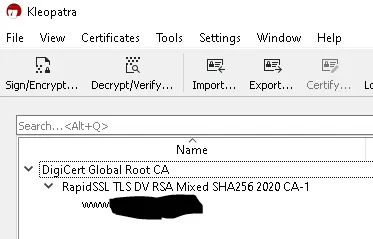
- If your original certificate is in PEM format you should use a tool such as GNU Kleopatra to open the pem file and inspect the certificate hierarchy as in the example below.
After having determined what your CA intermediate certificates are, navigate to the CA website and search for these publicly available intermediate certificates. One good example of this is Digicert website: https://www.digicert.com/kb/digicert-root-certificates.htm#intermediates.
You should normally not need the CA root certificate for most modern certificates, but it’s a good idea to download the CA root as well, just in case you need it in legacy systems and clients which dont have an up to date CA hierarchy certificate store by default.
After you have gathered all the above certificate files, you have two options:
- Use a graphical tool, such as the following Web App offered by SSLShopper: https://www.sslshopper.com/ssl-converter.html. The graphical wizard will guide you step-by-step through to exporting your PFX file.
- Use the openssl command line tool, available for all major operating systems at: https://www.openssl.org/source/. A good and quick option for Windows, if you don’t have time to compile the software yourself, is Win32OpenSSL.
Sources
Section titled “Sources”https://www.sslshopper.com/ssl-converter.html
https://www.digicert.com/kb/digicert-root-certificates.htm#intermediates
https://www.digicert.com/help/
4. TRACE-AI Execution Workflow
Section titled “4. TRACE-AI Execution Workflow”- Triage: Review monitoring dashboards or error metrics for initial anomaly spikes or timeout signatures.
- Record Evidence: Export service diagnostic logs, event viewers, or failure traces.
- Analyze: Correlate error signatures against known infrastructure or configuration limits.
- Correlate: Match active incident timeline against recent deployments or scale events.
- Execute & Verify: Apply corrective remediation steps and verify telemetry baseline recovery.
5. Vendor Documentation & Validation Guardrails
Section titled “5. Vendor Documentation & Validation Guardrails”- Authority Reference: Cross-reference configuration changes against official vendor documentation.
- Validation Gate: Require staging environment testing and Human-in-the-Loop SME approval before production changes.