How to change keyboard mappings in Linux and Windows
You have a broken or malfunctioning keyboard key in your Linux or Windows machine and you need to permanently remap it to another key.
Solution
Section titled “Solution”In the case of Linux you can achieve this via the Key Mapper software. Key Mapper is a free and open-source tool written in Python 3. You can download it from https://github.com/sezanzeb/key-mapper/releases. You can install key mapper using following command in ubuntu, after having downloaded the .deb package:
sudo apt install ./Downloads/key-mapper*.debAn example of Key Mapper is shown below.
Windows
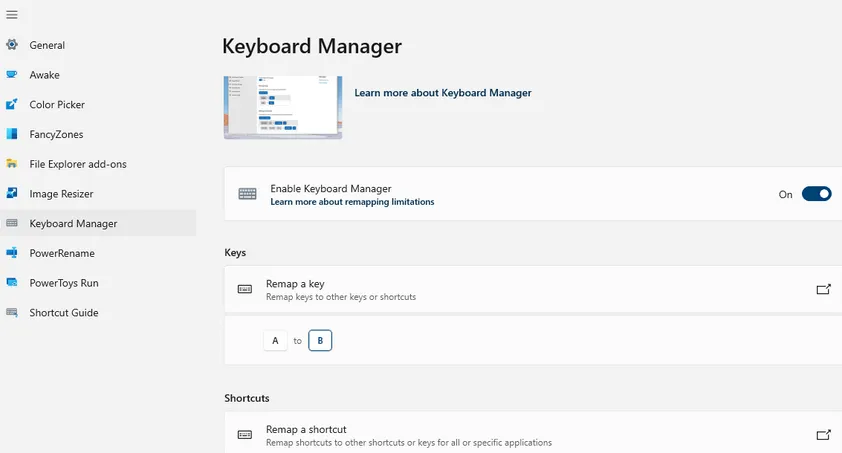
Section titled “Windows”Using PowerToys, you can make any key on your keyboard act like any other key and even remap shortcuts. You can download Powertoys from https://github.com/microsoft/PowerToys/releases/. Make use of keyboard manager (part of PowerToys) as per the official documentation: https://docs.microsoft.com/en-us/windows/powertoys/keyboard-manager.
4. TRACE-AI Execution Workflow
Section titled “4. TRACE-AI Execution Workflow”- Triage: Review monitoring dashboards or error metrics for initial anomaly spikes or timeout signatures.
- Record Evidence: Export service diagnostic logs, event viewers, or failure traces.
- Analyze: Correlate error signatures against known infrastructure or configuration limits.
- Correlate: Match active incident timeline against recent deployments or scale events.
- Execute & Verify: Apply corrective remediation steps and verify telemetry baseline recovery.
5. Vendor Documentation & Validation Guardrails
Section titled “5. Vendor Documentation & Validation Guardrails”- Authority Reference: Cross-reference configuration changes against official vendor documentation.
- Validation Gate: Require staging environment testing and Human-in-the-Loop SME approval before production changes.