FsLogix troubleshooting status code 0x16 error code 0x20
If the error message which the end user receives upon remote desktop logon has the following FsLogix troubleshooting codes:
Status 0x16
Reason 0x0
Error 0x20
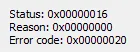
Always consult the official FsLogix troubleshooting guide (FsLogix), official FsLogix troubleshooting guide (Microsoft) and the FsLogix status code reference.
For this FsLogix error, carry out the following:
-
Firstly, always check the logs based on username and timestamp of FsLogix login failure. Location of FsLogix logs should be on a central SMB share (highly available).
-
For the error above, if you detect the following lines in the log file:
Attempting merge of diff disk: \\fslogixprofilespath\usernameSID\RW.VHDX
[INFO] One of the VHDs to merge is open in another session
[INFO] RW diff disk is open in another session
[INFO] Status set to 22: Error handling profile
[INFO] Error set to 32
[ERROR:00000020] handleProfileType error (The process cannot access the file because it is being used by another process.)
After investigation, there can be some FsLogix profile-related files open on the file server for the specific user. After these files are automatically closed from MMC console –> Computer Management –> Shared Folders –> Open Files (all open files for userSID under \\fslogixprofilespath\userSID* ) the error can be resolved and the user will be able to logon to Citrix again.
Important update:
Never manually stop any FsLogix processes or file handles from the Shared Folders MMC console. Doing so will likely cause corruption in the FsLogix profile. Therefore it is imperative to wait for the user logoff process to be gracefully completed. If this is not the case, then the only workaround as of May 5h 2020 is to entirely delete the .vhdx file of the user’s profile after logoff and create a new profile upon next user logon.
Also always check for antivirus related issues. Ensure that you have the correct antivirus exclusions configuration for FsLogix. Review the following KB article for more details.
4. TRACE-AI Execution Workflow
Section titled “4. TRACE-AI Execution Workflow”- Triage: Review monitoring dashboards or error metrics for initial anomaly spikes or timeout signatures.
- Record Evidence: Export service diagnostic logs, event viewers, or failure traces.
- Analyze: Correlate error signatures against known infrastructure or configuration limits.
- Correlate: Match active incident timeline against recent deployments or scale events.
- Execute & Verify: Apply corrective remediation steps and verify telemetry baseline recovery.
5. Vendor Documentation & Validation Guardrails
Section titled “5. Vendor Documentation & Validation Guardrails”- Authority Reference: Cross-reference configuration changes against official vendor documentation.
- Validation Gate: Require staging environment testing and Human-in-the-Loop SME approval before production changes.