How to resolve Citrix ADC error "Failure - TCP connection successful, but application timed out" on NetScaler"
You may notice the following in the Citrix ADC System Log, either inside the ADC GUI dashboard or via the newnslog log: “Failure- TCP connection successful, but application timed out”. This corresponds to Citrix ADC monitors which fluctuate between the DOWN and UP states. For example, the down state lasts for about 4 seconds and then the monitor shows again an UP state.
Solution
Section titled “Solution”To resolve this issue increase the time-out value, if your network has high latency. In order to change the properties of the Citrix ADC monitor, run the following command in Citrix ADC shell. You need to edit the Response timeout value to a reasonable setting, depending on your network conditions. The response timeout value may not be editable via the GUI, so you will need to use CLI instead.
set mon [monitorname] [monitortype] -resptimeout 8 secondssave ns conf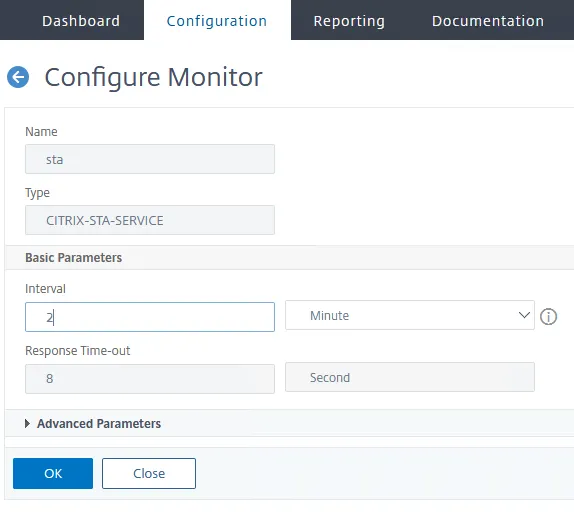
You can find more detailed guidance and step-by-step procedures for analyzing and troubleshooting Citrix Virtual Apps and Desktops organized by category in my Citrix Virtual Apps and Desktops Troubleshooting e-book.
Sources
Section titled “Sources”https://support.citrix.com/article/CTX215481
https://support.citrix.com/article/CTX207195
4. TRACE-AI Execution Workflow
Section titled “4. TRACE-AI Execution Workflow”- Triage: Review monitoring dashboards or error metrics for initial anomaly spikes or timeout signatures.
- Record Evidence: Export service diagnostic logs, event viewers, or failure traces.
- Analyze: Correlate error signatures against known infrastructure or configuration limits.
- Correlate: Match active incident timeline against recent deployments or scale events.
- Execute & Verify: Apply corrective remediation steps and verify telemetry baseline recovery.
5. Vendor Documentation & Validation Guardrails
Section titled “5. Vendor Documentation & Validation Guardrails”- Authority Reference: Cross-reference configuration changes against official vendor documentation.
- Validation Gate: Require staging environment testing and Human-in-the-Loop SME approval before production changes.