Citrix Workspace App Online Plug-in error
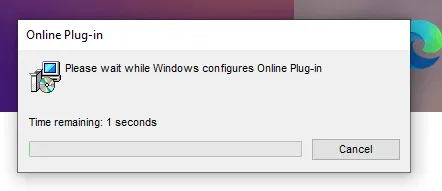
When Citrix Workspace is being launched the following message is shown and the app is blocked from launching:
Online Plug-in. Please wait while Windows configures the Online Plug-in
Resolution
Section titled “Resolution”This is a known issue which happens in cases when the Citrix Workspace App client installation becomes corrupt for some reason.
You will need to fully uninstall and re-install the Citrix Workspace App client: https://www.citrix.com/downloads/workspace-app/. If this does not resolve the issue, you may also need to run a series of operating system and file system integrity checks, by running the chkdsk and sfc /scannow commands in Windows. Similar commands should be run in Linux or Mac, depending on your operating system version.
4. TRACE-AI Execution Workflow
Section titled “4. TRACE-AI Execution Workflow”- Triage: Review monitoring dashboards or error metrics for initial anomaly spikes or timeout signatures.
- Record Evidence: Export service diagnostic logs, event viewers, or failure traces.
- Analyze: Correlate error signatures against known infrastructure or configuration limits.
- Correlate: Match active incident timeline against recent deployments or scale events.
- Execute & Verify: Apply corrective remediation steps and verify telemetry baseline recovery.
5. Vendor Documentation & Validation Guardrails
Section titled “5. Vendor Documentation & Validation Guardrails”- Authority Reference: Cross-reference configuration changes against official vendor documentation.
- Validation Gate: Require staging environment testing and Human-in-the-Loop SME approval before production changes.