Error 1069 the service did not start due to a logon failureCitrix
You notice that the Citrix Telemetry service fails to start on a Citrix Virtual Apps and Desktops VDA server with the following error: “Citrix error 1069 the service did not start due to a logon failure”. The error is shown in the screenshot below.
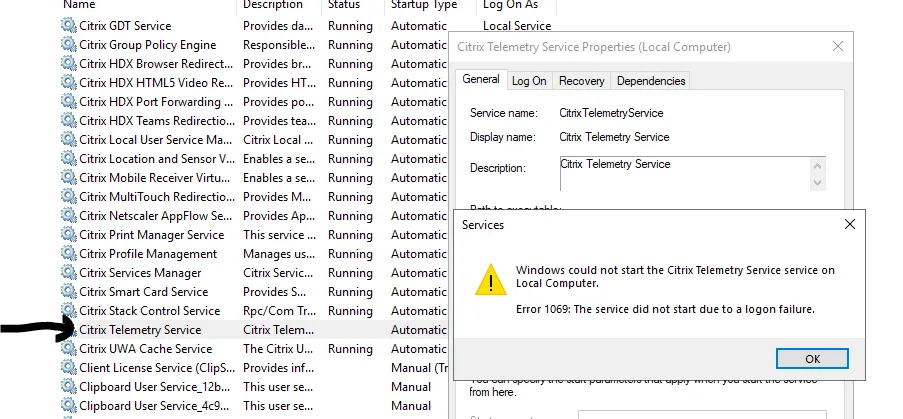
Solution
Section titled “Solution”The “Citrix error 1069 the service did not start due to a logon failure” is most likely caused by a change you made in either the VDA local machine policy or to a Group Policy object affecting the Citrix VDA machine in question. You should modify the policy to ensure that the service account used by the Citrix Telemetry service is provided the Log on as a Service permission. You should check the local security policy “Local Security Policies > Security Settings > Local Policies > User Rights Assignment > Log on as a Service” and any relevant GPO setting and update it accordingly.
Source
Section titled “Source”https://support.citrix.com/article/CTX129259
4. TRACE-AI Execution Workflow
Section titled “4. TRACE-AI Execution Workflow”- Triage: Review monitoring dashboards or error metrics for initial anomaly spikes or timeout signatures.
- Record Evidence: Export service diagnostic logs, event viewers, or failure traces.
- Analyze: Correlate error signatures against known infrastructure or configuration limits.
- Correlate: Match active incident timeline against recent deployments or scale events.
- Execute & Verify: Apply corrective remediation steps and verify telemetry baseline recovery.
5. Vendor Documentation & Validation Guardrails
Section titled “5. Vendor Documentation & Validation Guardrails”- Authority Reference: Cross-reference configuration changes against official vendor documentation.
- Validation Gate: Require staging environment testing and Human-in-the-Loop SME approval before production changes.