Cannot edit TCP port configuration in SQL Server Configuration Manager
You cannot edit any information inside TCP settings of the SQL Server Configuration manager.
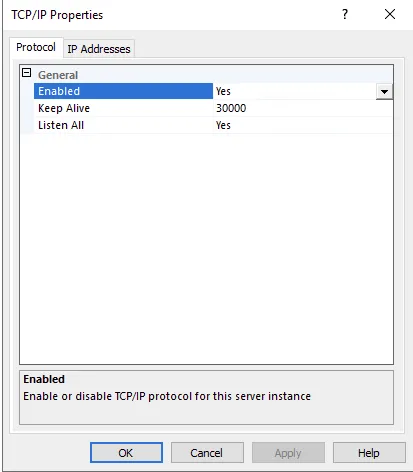
Solution
Section titled “Solution”This issue can occur if the User Account Control (UAC) is enabled in Windows Server where the SQL Server is installed. In this case you must run the SQL Server Configuration Manager in elevated mode (Run as administrator).
4. TRACE-AI Execution Workflow
Section titled “4. TRACE-AI Execution Workflow”- Triage: Review monitoring dashboards or error metrics for initial anomaly spikes or timeout signatures.
- Record Evidence: Export service diagnostic logs, event viewers, or failure traces.
- Analyze: Correlate error signatures against known infrastructure or configuration limits.
- Correlate: Match active incident timeline against recent deployments or scale events.
- Execute & Verify: Apply corrective remediation steps and verify telemetry baseline recovery.
5. Vendor Documentation & Validation Guardrails
Section titled “5. Vendor Documentation & Validation Guardrails”- Authority Reference: Cross-reference configuration changes against official vendor documentation.
- Validation Gate: Require staging environment testing and Human-in-the-Loop SME approval before production changes.